
JS学习笔记

cnbigmx 萌新

webAPIs

属性选择器

1
2
3
4
5
<a class="test" id="idtest" data-state="selected" name="name" </a>
document.querySelector('.test')
document.querySelector('#idtest')
document.querySelector('[naem=name]')
document.querySelector('[data-state=selected])

classList

1
2
3
4
5
6
7
8
//添加类
username.classList.add('类名')
//移出类
username.classList.remove('类名')
//切换类(有就移出,没有就加上)
username.classList.toggle('类名')
//查看类,有返回true,没有返回false
username.classList.contains('类名')

offsetWidth

1
2
3
4
5
6
//只读元素 获取宽高,元素的内容+padding+border
document.documentElement.offsetWidth
document.documentElement.offsetHigth
//以带有定位的父级为准,默认左上角
document.documentElement.offsetLeft
document.documentElement.offsetTop

clientWidth

1
2
3
4
//读写元素
//获取宽高,元素的内容+padding
document.documentElement.clientWidth
document.documentElement.clientHigth

scrollTop

1
2
3
4
5
6
7
8
9
10
11
//获取滚动距离
document.documentElement.scrollTop
document.documentElement.scrollLeft
//检测滚动
window.addEventListener('scroll', function () {
}
})
//检测缩放
window.addEventListener('resize', function () {
}
})

日期对象

1
2
3
4
5
6
7
8
9
10
11
12
13
14
15
16
17
18
19
20
const date = new Date()
//获取年份
date.getFullYear()
//获取月份(0-11)
date.getMonth()
//获取月份中每一天
date.getDate()
//获取星期(0-6对应7-1) 小时 分钟 秒
date.getDay()
getHours()
getMinutes()
getSeconds()
// 2023/8/7 17:10:18
date.toLocaleString()

//获取时间戳
const date = new Date()
date.getTime()
+new Date()
Date.now()

节点

1
2
3
4
5
6
7
8
9
10
11
12
13
14
15
16
17
18
19
20
21
22
23
24
25
26
27
//父节点
const baby = document.querySelector('.baby')
console.log(baby.parentNode) // 返回dom对象
//子节点
const ul = document.querySelector('ul') // ul
console.log(ul.children) // 得到伪数组 选择的是 亲儿子
//兄弟节点
const li2 = document.querySelector('ul li:nth-child(2)')
console.log(li2.previousElementSibling) // 上一个兄弟
console.log(li2.nextElementSibling) // 下一个兄弟

//增加节点
const ul = document.querySelector('ul')
const li = document.createElement('li')
li.innerHTML = '我是li'
//追加节点 作为最后一个子元素
//ul.appendChild(li)
//追加节点 insertBefore(插入的元素, 放到哪个元素的前面)
ul.insertBefore(li, ul.children[0])

//克隆节点 元素.cloneNode(true)
const li1 = ul.children[0].cloneNode(true)

//删除节点
const ul = document.querySelector('ul')
// 删除节点需要父元素.removeChlid(子元素)
ul.removeChild(ul.children[0])

移动端

1
2
3
4
5
6
7
8
9
10
11
12
13
const div = document.querySelector('div')
// 1. 触摸
div.addEventListener('touchstart', function () {
console.log('开始摸我了')
})
// 2. 离开
div.addEventListener('touchend', function () {
console.log('离开了')
})
// 3. 移动
div.addEventListener('touchmove', function () {
console.log('一直摸,移动')
})

轮播图插件:swiper

倒计时

1
2
3
4
//1s后执行,只会执行一次 
setTimeout(function () {
console.log(3)
}, 1000)

定时器

1
2
3
4
5
//每隔1s执行 
let timerId = setInterval(function () {
clearInterval(timerId)//清除定时器
}
}, 1000)

location对象

1
2
3
4
// 1. href 经常用href 利用js的方法去跳转页面
location.href = 'http://www.baidu.com'
// 强制刷新 ctrl+f5
location.reload(true)

检测浏览器信息

1
2
3
4
5
6
7
8
9
10
11
12
13
// 检测 userAgent(浏览器信息)
!(function () {
const userAgent = navigator.userAgent
// 验证是否为Android或iPhone
const android = userAgent.match(/(Android);?[\s\/]+([\d.]+)?/)
const iphone = userAgent.match(/(iPhone\sOS)\s([\d_]+)/)
// 如果是Android或iPhone,则跳转至移动站点
if (android || iphone) {
location.href = 'http://m.itcast.cn'
}
})();
// !(function () { })();
!function () { }()

history:浏览器历史

1
2
3
4
5
6
7
8
9
10
11
12
const back = document.querySelector('button:first-child')
const forward = back.nextElementSibling//back下一个兄弟元素
back.addEventListener('click', function () {
// 后退一步
// history.back()
history.go(-1)
})
forward.addEventListener('click', function () {
// 前进一步
// history.forward()
history.go(1)
})

### ocalStorage:本地存储(除非手动删除,否则永远储存)

1
2
3
4
5
6
7
8
9
10
11
12
13
14
15
16
17
18
19
20
21
22
23
24
25
26
// 1. 要存储一个名字  'uname', 'pink老师'
// localStorage.setItem('键','值')
localStorage.setItem('uname', 'pink老师')
// 2. 获取方式 都加引号
console.log(localStorage.getItem('uname'))
// 3. 删除本地存储 只删除名字
localStorage.removeItem('uname')
// 4. 改 如果原来有这个键,则是改,如果没有这个键是增
localStorage.setItem('uname', 'red老师')
// 本地存储只能存储字符串数据类型
localStorage.setItem('age', 18)
console.log(localStorage.getItem('age'))
const obj = {
uname: 'pink老师',
age: 18,
gender: '女'
}
// 1.复杂数据类型存储必须转换为 JSON字符串存储
localStorage.setItem('obj', JSON.stringify(obj))
// JSON 对象 属性和值有引号,而是引号统一是双引号
// {"uname":"pink老师","age":18,"gender":"女"}
// 取
// console.log(typeof localStorage.getItem('obj'))
// 2. 把JSON字符串转换为 对象
const str = localStorage.getItem('obj') // {"uname":"pink老师","age":18,"gender":"女"}
console.log(JSON.parse(str))

数组map方法

1
2
3
4
5
6
7
8
const arr = ['red', 'blue', 'green']
// map 方法也是遍历 处理数据 可以返回一个数组
const newArr = arr.map(function (item, i) {
// console.log(item) // 数组元素 'red'
// console.log(i) // 下标
return item + '老师'
})
console.log(newArr)//['red老师', 'blue老师', 'green老师']

数组join方法

1
2
3
const arr = ['red', 'blue', 'green']
// 把数组元素转换为字符串
console.log(arr.join('*')) //指定*分隔

正则表达式

1
2
3
4
5
6
7
8
9
10
11
12
13
14
15
16
17
18
19
20
21
22
23
24
25
const str = '我们在学习前端,希望学习前端能高薪毕业'
// 正则表达式使用:
// 1. 定义规则
const reg = /前端/
// 2. 是否匹配
// console.log(reg.test(str)) // true
// 3. exec()
console.log(reg.exec(str)) // 返回数组 找不到reg返回null

// 边界符 ^ /^a/就是以a为开头
// 边界符 $ /b$/就是以b为开头
// 如果边界符 ^$一起表示精确匹配,例如:/^a$/,只能匹配a,而aa错误
// 量词 * 类似 >=0 次
// 量词 + 类似 >=1 次
// 量词 ? 类似 0 || 1
// 量词 {n} 写几,就必须出现几次
// 量词 {n,} >=n
// 量词 {n,m} 逗号左右两侧千万不能有空格 >=n && <= m
// 字符类 [abc] 只选1个
// 字符类 \d 表示0-9 \D 表示除了0-9 \w 表示任意字母数字下划线 \W 表示除了任意字母数字下划线 \s 表示匹配空格(包括换行符、制表 符) \S 表示匹配非空格
// 字符类 [a-z] [A-Z] [0-9] 只选1个
// 取反 [^a-z] 除a-z以外选一个
// 字符类 . 除了换行符以外的单个字符
// 修饰符 i /^aaaa$/i 不区分大小写
// 修饰符 g 全局查找

e

1
2
3
4
5
6
7
8
9
10
11
12
13
14
15
   const pane = document.querySelectorAll('.tab-pane')
const tab_nav = document.querySelector('.tab-nav')
tab_nav.addEventListener('click',function(e){
//e.target.tagName === 'A' 判断是不是<a>标签,e是被点击的元素
if(e.target.tagName === 'A')
{
tab_nav.querySelector('.active').classList.remove('active')
e.target.classList.add('active')
for(let i =0;i<pane.length;i++)
{
pane[i].style.display = 'none'
}
pane[`${e.target.dataset.id}`].style.display = 'block'
}
})

获取元素位置

1
2
3
4
5
6
// e.pageX e.pageY 鼠标位置 
// getBoundingClientRect().上下左右 元素位置
middle.addEventListener('mousemove',function(e){
let x = e.pageX - middle.getBoundingClientRect().left;
let y = e.pageY - middle.getBoundingClientRect().top;
})

ES6+

闭包

外部可以访问使用 函数内部的变量

1
2
3
4
5
6
7
8
9
10
// 闭包形式 统计函数调用的次数
function count() {
let i = 0
function fn() {
i++
console.log(`函数被调用了${i}次`)
}
return fn
}
const fun = count()

变量提升

  • 把所有var声明的变量提升到 当前作用域的最前面
  • 只提升声明, 不提升赋值

函数提升

  • 会把所有函数声明提升到当前作用域的最前面
  • 只提升函数声明,不提升函数调用
1
2
3
4
fn()
function fn() {
console.log('函数提升')
}
  • 函数表达式 必须先声明和赋值, 后调用 否则 报错
1
2
3
4
fun()
var fun = function () {
console.log('函数表达式')
}

动态数组

1
2
3
4
5
6
7
8
9
10
11
12
13
//伪数组    
function getSum() {
// arguments 动态参数 只存在于 函数里面
// 是伪数组 里面存储的是传递过来的实参
// console.log(arguments) [2,3,4]
let sum = 0
for (let i = 0; i < arguments.length; i++) {
sum += arguments[i]
}
console.log(sum)
}
getSum(2, 3, 4)
getSum(1, 2, 3, 4, 2, 2, 3, 4)

剩余参数

1
2
3
4
5
6
//真数组   
function getSum(a, b, ...arr) {
console.log(arr) // 使用的时候不需要写 ...
}
getSum(2, 3)
getSum(1, 2, 3, 4, 5)

展开运算符

1
2
3
4
5
6
7
8
const arr1 = [1, 2, 3]
// 展开运算符 可以展开数组
console.log(...arr)

// ...arr1 === 1,2,3
// 1 求数组最大值
console.log(Math.max(...arr1)) // 3
console.log(Math.min(...arr1)) // 1

箭头函数

  • 基本语法

    1
    2
    3
    4
    5
    6
    7
    const fn = () => {
    console.log(123)
    }
    fn()
    //等同于 const fn = function () {
    // console.log(123)
    // }
  • 只有一个参数时

    1
    2
    3
    4
    // 只有一个形参的时候,可以省略小括号
    const fn = x => {
    console.log(x)
    }
  • 只有一行代码的

    1
    2
    3
    4
    5
    // 只有一行代码的时候,我们可以省略大括号
    const fn = x => console.log(x)
    //只有一行代码的时候,可以省略return
    const fn1 = (x,y) => x + y
    console.log(fn1(1))
  • 箭头函数可以直接返回一个对象(对象需要加“()”)

    1
    2
    const fn = (uname) => ({ uname: uname })
    console.log(fn('刘德华'))
  • 没有arguments 动态参数,但是剩余参数

    1
    2
    3
    4
    5
    6
    7
    8
    9
    const getSum = (...arr) => {
    let sum = 0
    for (let i = 0; i < arr.length; i++) {
    sum += arr[i]
    }
    return sum
    }
    const result = getSum(2, 3, 4)
    console.log(result) // 9
  • 箭头函数没有this,是上一层作用域的this 指向

    1
    2
    3
    4
    5
    6
    7
    8
    9
    10
    11
    12
    13
    14
    15
    16
    17
    18
    19
    20
    21
    22
    23
    24
    25
    26
    27
    28
    29
     //以前this的指向:  谁调用的这个函数,this 就指向谁
    console.log(this) // window
    // 普通函数
    function fn() {
    console.log(this) // window
    }
    window.fn()
    // 对象方法里面的this
    const obj = {
    name: 'andy',
    sayHi: function () {
    console.log(this) // obj
    }
    }
    obj.sayHi()

    // 2. 箭头函数的this 是上一层作用域的this 指向
    const fn = () => {
    console.log(this) // window
    }
    fn()
    // 对象方法箭头函数 this
    const obj = {
    uname: 'pink老师',
    sayHi: () => {
    console.log(this) // this 指向谁? window
    }
    }
    obj.sayHi()

数组解构

1
2
3
4
5
6
7
8
9
10
11
12
13
14
// const arr = [100, 60, 80]
// 数组解构 赋值
// // const [max, min, avg] = arr
const [max, min, avg] = [100, 60, 80]
// // const max = arr[0]
// // const min = arr[1]
// // const avg = arr[2]
console.log(max) // 100
console.log(avg) // 80
// 交换2个变量的值
let a = 1
let b = 2;
[b, a] = [a, b]
console.log(a, b)

注意需要加” ; “,用来示意语句结束

1
2
3
4
5
6
7
8
9
// 1. 立即执行函数要加
(function () { })();
// 2. 使用数组的时候
// const arr = [1, 2, 3]
const str = 'pink';
[1, 2, 3].map(function (item) {
console.log(item)
})

对象解构

  • 解构基本语法

    1
    2
    3
    4
    5
    6
    7
    8
      const { uname, age } = {age: 18, uname: 'pink老师' }
    // 等价于 const uname = obj.uname
    // 要求属性名和变量名必须一直才可以

    // 对象解构的变量名 可以重新改名 旧变量名: 新变量名
    const { uname: username, age } = { uname: 'pink老师', age: 18 }
    console.log(username)
    console.log(age)
  • 解构数组对象

    1
    2
    3
    4
    5
    6
    7
    8
    9
    const pig = [
    {
    uname: '佩奇',
    age: 6
    }
    ]
    const [{ uname, age }] = pig
    console.log(uname)
    console.log(age)
  • 多级对象解构

    1
    2
    3
    4
    5
    6
    7
    8
    9
    10
    11
    12
    13
    14
    15
    16
    //普通对象    
    const pig = {
    name: '佩奇',
    family: {
    mother: '猪妈妈',
    father: '猪爸爸',
    sister: '乔治'
    },
    age: 6
    }
    // 多级对象解构
    const { name, family: { mother, father, sister } } = pig
    console.log(name)
    console.log(mother)
    console.log(father)
    console.log(sister)
    1
    2
    3
    4
    5
    6
    7
    8
    9
    10
    11
    12
    13
    14
    15
    16
    17
    //数组对象
    const person = [
    {
    name: '佩奇',
    family: {
    mother: '猪妈妈',
    father: '猪爸爸',
    sister: '乔治'
    },
    age: 6
    }
    ]
    const [{ name, family: { mother, father, sister } }] = person
    console.log(name)
    console.log(mother)
    console.log(father)
    console.log(sister)

    还可以这样使用

    1
    2
    3
    4
    5
    6
    7
    8
    9
    10
    11
    12
    13
    14
    15
    16
    17
    18
    19
    20
    21
    22
    23
    24
    25
    26
    27
    28
    29
    30
     // 1. 这是后台传递过来的数据
    const msg = {
    "code": 200,
    "msg": "获取新闻列表成功",
    "data": [
    {
    "id": 1,
    "title": "5G商用自己,三大运用商收入下降",
    "count": 58
    },
    {
    "id": 2,
    "title": "国际媒体头条速览",
    "count": 56
    },
    {
    "id": 3,
    "title": "乌克兰和俄罗斯持续冲突",
    "count": 1669
    },

    ]
    }
    // 需求, 为了防止msg里面的data名字混淆,要求渲染函数里面的数据名改为 myData
    function render({ data: myData }) {
    // 要求将 获取过来的 data数据 更名为 myData
    // 内部处理
    console.log(myData)
    }
    render(msg)

forEach

1
2
3
4
5
6
// forEach 就是遍历  加强版的for循环  适合于遍历数组对象
const arr = ['red', 'green', 'pink']
const result = arr.forEach(function (item, index) {
console.log(item) // 数组元素 red green pink
console.log(index) // 索引号
})

filter

1
2
3
4
5
6
7
8
9
const arr = [10, 20, 30]
// const newArr = arr.filter(function (item, index) {
// // console.log(item)
// // console.log(index)
// return item >= 20
// })
// 返回的符合条件的新数组
const newArr = arr.filter(item => item >= 20)
console.log(newArr)

构造函数

  • 创建结构相同但值不同的对象
  • 构造函数创建的实例对象彼此独立互不影响
  • 构造函数的属性被称为静态属性,构造函数的方法被称为静态方法(总称静态成员)
1
2
3
4
5
functon Pig(uname,age){
this.uname = uname
this.age = age
}
const p = new Pig('佩奇', 6)

js 底层完成, 把简单数据类型包装为了引用数据类型

1
2
3
4
const str = 'pink'
console.log(str.length)
// js 底层完成, 把简单数据类型包装为了引用数据类型
const str = new String('pink')

内置构造函数

Object

  • 获得所有的属性名 Object.keys()

    1
    2
    const o = { uname: 'pink', age: 18 }
    console.log(Object.keys(o)) //返回数组['uname', 'age']
  • 获得所有的属性值 Object.values() ,返回的是数组

    1
    2
    const o = { uname: 'pink', age: 18 }
    console.log(Object.values(o)) //  ['pink', 18]
  • 对象的拷贝

    1
    2
    3
    4
    5
    6
    const o = { uname: 'pink', age: 18 }
    // const oo = {}
    // Object.assign(oo, o)
    // console.log(oo)
    Object.assign(o, { gender: '女' })
    console.log(o)

Array

实例方法:forEach(不返回数组,用于查找遍历数组元素),filter(返回筛选满足条件的新数组),map(返回处理之后的新数组),reduce(返回累计处理的结果,经常用于求和)

1
2
3
4
5
6
7
8
9
10
// arr.reduce(function(累计值, 当前元素){}, 起始值)
//无起始值以数组第一个元素
const arr = [1, 2, 3]

arr.reduce(function (prev, item) {
return prev + item
}, 0)

const re = arr.reduce((prev, item) => prev + item)
console.log(re)// re = 6 1+2+3

find和every

1
2
3
4
5
6
7
// 1.find 查找 返回这个对象
const mi = arr.find(item => item.name === '小米')
console.log(mi)
// 2.every 每一个是否都符合条件,如果都符合返回 true ,否则返回false
const arr1 = [10, 20, 30]
const flag = arr1.every(item => item >= 20)
console.log(flag)

实例方法简记

Test

静态方法:Array.form(),把伪数组转换为真数组

1
2
3
4
5
6
7
//  Array.from(lis) 把伪数组转换为真数组
const lis = document.querySelectorAll('ul li')
// console.log(lis)
// lis.pop() 报错
const liss = Array.from(lis)
liss.pop()
console.log(liss)

String

实例方法

  • split 把字符串 转换为 数组

    1
    2
    3
    4
    5
    6
    7
    //1. split 把字符串 转换为 数组  和 join() 相反
    const str = 'pink,red'
    const arr = str.split(',')
    console.log(arr)
    const str1 = '2022-4-8'
    const arr1 = str1.split('-')
    console.log(arr1)
  • 字符串的截取 substring

    1
    2
    3
    4
    5
    //  字符串的截取   substring(开始的索引号[, 结束的索引号])
    // 如果省略 结束的索引号,默认取到最后
    // 结束的索引号不包含想要截取的部分 左闭右开
    const str = '今天又要做核酸了'
    console.log(str.substring(5, 7))// 核酸
  • startsWith

    1
    2
    3
    // startsWith 判断是不是以某个字符开头
    const str = 'pink老师上课中'
    console.log(str.startsWith('pink'))//true
  • includes

    1
    2
    3
    // includes 判断某个字符是不是包含在一个字符串里面 区分大小写
    const str = '我是pink老师'
    console.log(str.includes('pink')) // true
  • 转字符串

    1
    2
    3
    const num = 10
    console.log(String(num))
    console.log(num.toString())

Number

toFixed

1
2
3
// toFixed 方法可以让数字指定保留的小数位数 四舍五入
const num = 10.923
console.log(num.toFixed(2))//10.92

两种编程思想

面向过程

分析出解决问题需要的步骤,然后用函数把这些步骤一步一步实现,按照步骤解决问题.比如c语言

面向对象

把事务分解为一个个对象,然后对象之间分工合作,以对象功能来划分问题.比如java

特点: 封装性 继承性 多态性

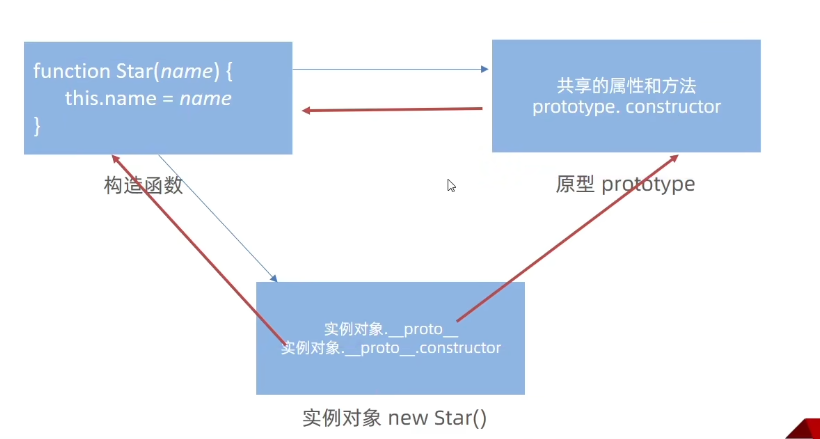
原型对象

  • JavaScript 规定,每一个构造函数都有一个 prototype 属性,指向另一个对象,所以我们也称为原型对象
  • 这个对象可以挂载函数,对象实例化不会多次创建原型上函数,节约内存
  • 我们可以把那些不变的方法,直接定义在 prototype 对象上,这样所有对象的实例就可以共享这些方法。
  • 构造函数和原型对象中的this 都指向 实例化的对象
1
2
3
4
5
6
7
8
9
10
11
12
13
14
15
16
let that
function Star(uname) {
// that = this
// console.log(this)
this.uname = uname
}
// 原型对象里面的函数this指向的还是 实例对象 ldh
Star.prototype.sing = function () {
that = this
console.log('唱歌')
}
// 实例对象 ldh
// 构造函数里面的 this 就是 实例对象 ldh
const ldh = new Star('刘德华')
ldh.sing()
console.log(that === ldh)//true

公共方法挂载到原型身上

1
2
3
4
5
6
7
8
9
10
11
12
13
14
15
16
17
18
19
20
21
22
23
24
25
26
27
// 自己定义 数组扩展方法  求和 和 最大值 
// 1. 我们定义的这个方法,任何一个数组实例对象都可以使用
// 2. 自定义的方法写到 数组.prototype 身上
// 1. 最大值
const arr = [1, 2, 3]
Array.prototype.max = function () {
// 展开运算符
return Math.max(...this)
// 原型函数里面的this 指向谁? 实例对象 arr
}
// 2. 最小值
Array.prototype.min = function () {
// 展开运算符
return Math.min(...this)
// 原型函数里面的this 指向谁? 实例对象 arr
}
console.log(arr.max())
console.log([2, 5, 9].max())
console.log(arr.min())
// const arr = new Array(1, 2)
// console.log(arr)
// 3. 求和 方法
Array.prototype.sum = function () {
return this.reduce((prev, item) => prev + item, 0)
}
console.log([1, 2, 3].sum())
console.log([11, 21, 31].sum())

constructor

指向创造这个原型对象的 构造函数

类似继承覆盖?

1
2
3
4
5
6
7
8
9
10
11
12
13
14
function Star() {
}
// console.log(Star.prototype)
Star.prototype = {
// 重新指回创造这个原型对象的 构造函数
constructor: Star,
sing: function () {
console.log('唱歌')
},
dance: function () {
console.log('跳舞')
},
}
console.log(Star.prototype)

对象原型

对象都会有一个属性__proto__指向构造函数的prototype原型对象 ,之所以对象可以使用构造函数prototype原型对象的属性和方法,就是因为对象有__proto__原型的存在.__proto__也有constructor属性指向创造这个对象的构造函数

__proto__不是js标准属性,只读

1
2
3
4
5
6
7
8
function Star() {
}
const ldh = new Star()
// 对象原型__proto__ 指向 改构造函数的原型对象
console.log(ldh.__proto__)
// console.log(ldh.__proto__ === Star.prototype)
// 对象原型里面有constructor 指向 构造函数 Star
console.log(ldh.__proto__.constructor === Star)

原型继承

抽取公共的方法和属性

1
2
3
4
5
6
7
8
9
10
11
12
13
14
15
16
17
18
19
20
21
22
23
24
25
26
27
28
29
30
31
32
33
34
35
36
37
38
39
40
41
42
// 继续抽取   公共的部分放到原型上
// const Person1 = {
// eyes: 2,
// head: 1
// }
// const Person2 = {
// eyes: 2,
// head: 1
// }
// 构造函数 new 出来的对象 结构一样,但是对象不一样
function Person() {
this.eyes = 2
this.head = 1
}
// console.log(new Person)
// 女人 构造函数 继承 想要 继承 Person
function Woman() {

}
// Woman 通过原型来继承 Person
// 父构造函数(父类) 子构造函数(子类)
// 子类的原型 = new 父类
Woman.prototype = new Person() // {eyes: 2, head: 1}
// 指回原来的构造函数
Woman.prototype.constructor = Woman

// 给女人添加一个方法 生孩子
Woman.prototype.baby = function () {
console.log('宝贝')
}
const red = new Woman()
console.log(red)
// console.log(Woman.prototype)
// 男人 构造函数 继承 想要 继承 Person
function Man() {

}
// 通过 原型继承 Person
Man.prototype = new Person()
Man.prototype.constructor = Man
const pink = new Man()
console.log(pink)

原型链

基于原型对象的继承使得不同构造函数的原型对象关联在一起,并且这种关联的关系是一种链状的结构,我们将原型对象的链状结构关系称为原型链.
Test

① 当访问一个对象的属性(包括方法)时,首先查找这个对象自身有没有该属性。

② 如果没有就查找它的原型(也就是 __proto__指向的 prototype 原型对象)

③ 如果还没有就查找原型对象的原型(Object的原型对象)

④ 依此类推一直找到 Object 为止(null)

⑤ __proto__对象原型的意义就在于为对象成员查找机制提供一个方向,或者说一条路线

⑥ 可以使用 instanceof 运算符用于检测构造函数的 prototype 属性是否出现在某个实例对象的原型链上

1
2
3
4
5
6
7
8
9
10
11
12
13
14
15
// function Objetc() {}
console.log(Object.prototype)
console.log(Object.prototype.__proto__)

function Person() {

}
const ldh = new Person()
// console.log(ldh.__proto__ === Person.prototype)
// console.log(Person.prototype.__proto__ === Object.prototype)
console.log(ldh instanceof Person)//true
console.log(ldh instanceof Object)//true
console.log(ldh instanceof Array)//false
console.log([1, 2, 3] instanceof Array)//true
console.log(Array instanceof Object)//true

JavaScript 中对象的工作机制:当访问对象的属性或方法时,先在当前实例对象是查找,然后再去原型对象查找,并且原型对象被所有实例共享。

拷贝

浅拷贝:对基本数据类型进行值传递,对引用数据类型,使用其引用地址,不拷贝其内容,此为浅拷贝

深拷贝:对基本数据类型进行值传递,对引用数据类型,创建一个新的对象,并复制其内容,此为深拷贝。

浅拷贝
1
2
3
4
5
6
7
8
9
10
11
12
13
14
15
16
17
18
19
const obj = {
uname: 'pink',
age: 18,
family: {
baby: '小pink'
}
}
// 浅拷贝
// const o = { ...obj }
// console.log(o)
// o.age = 20
// console.log(o)
// console.log(obj)
const o = {}
Object.assign(o, obj)
o.age = 20
o.family.baby = '老pink'
console.log(o)//age:20 老pink
console.log(obj)//age: 18 老pink
深拷贝
循环递归方法
1
2
3
4
5
6
7
8
9
10
11
12
13
14
15
16
17
18
19
20
21
22
23
24
25
26
27
28
29
30
31
32
33
34
35
36
37
38
const obj = {
uname: 'pink',
age: 18,
hobby: ['乒乓球', '足球'],
family: {
baby: '小pink'
}
}
const o = {}
// 拷贝函数
function deepCopy(newObj, oldObj) {
//debugger打断点进行调试
debugger
for (let k in oldObj) {
// 处理数组的问题 一定先写数组 在写 对象 不能颠倒
if (oldObj[k] instanceof Array) {
newObj[k] = []
// newObj[k] 接收 [] hobby
// oldObj[k] ['乒乓球', '足球']
deepCopy(newObj[k], oldObj[k])
} else if (oldObj[k] instanceof Object) {
newObj[k] = {}
deepCopy(newObj[k], oldObj[k])
}
else {
// k 属性名 uname age oldObj[k] 属性值 18
// newObj[k] === o.uname 给新对象添加属性
newObj[k] = oldObj[k]
}
}
}
deepCopy(o, obj) // 函数调用 两个参数 o 新对象 obj 旧对象
console.log(o)
o.age = 20
o.hobby[0] = '篮球'
o.family.baby = '老pink'
console.log(obj)
console.log([1, 23] instanceof Object)
lodash方式
1
2
3
4
5
6
7
8
9
10
11
12
13
14
15
<script src="./lodash.min.js"></script>
<script>
const obj = {
uname: 'pink',
age: 18,
hobby: ['乒乓球', '足球'],
family: {
baby: '小pink'
}
}
const o = _.cloneDeep(obj)
console.log(o)
o.family.baby = '老pink'
console.log(obj)
</script>
JSON 方法
1
2
3
4
5
6
7
8
9
10
11
12
13
14
const obj = {
uname: 'pink',
age: 18,
hobby: ['乒乓球', '足球'],
family: {
baby: '小pink'
}
}
// 把对象转换为 JSON 字符串
// console.log(JSON.stringify(obj))
const o = JSON.parse(JSON.stringify(obj))
console.log(o)
o.family.baby = '123'
console.log(obj)

异常处理

throw
1
2
3
4
5
6
7
8
function fn(x, y) {
if (!x || !y) {
// throw '没有参数传递进来'
throw new Error('没有参数传递过来')
}
return x + y
}
console.log(fn())
try catch
1
2
3
4
5
6
7
8
9
10
11
12
13
14
15
16
17
18
19
function fn() {
try {
// 可能发送错误的代码 要写到 try
const p = document.querySelector('.p')
p.style.color = 'red'
} catch (err) {
// 拦截错误,提示浏览器提供的错误信息,但是不中断程序的执行
console.log(err.message)
throw new Error('你看看,选择器错误了吧')
// 需要加return 中断程序
// return
}
finally {
// 不管你程序对不对,一定会执行的代码
alert('弹出对话框')
}
console.log(11)
}
fn()

this

普通函数中
1
2
3
4
5
6
7
8
9
10
11
12
13
14
15
16
17
18
 // 普通函数:  谁调用我,this就指向谁
console.log(this) // window
function fn() {
console.log(this) // window
}
window.fn()
window.setTimeout(function () {
console.log(this) // window
}, 1000)
document.querySelector('button').addEventListener('click', function () {
console.log(this) // 指向 button
})
const obj = {
sayHi: function () {
console.log(this) // 指向 obj
}
}
obj.sayHi()
箭头函数

箭头函数中并不存在this,箭头函数中this默认绑定外层(最近作用域)this的值.

改变this指向
call
1
2
3
4
5
6
7
8
9
10
const obj = {
uname: 'pink'
}
function fn(x, y) {
console.log(this) // window
console.log(x + y)
}
// 1. 调用函数
// 2. 改变 this 指向
fn.call(obj, 1, 2)
apply
1
2
3
4
5
6
7
8
9
10
11
12
13
14
15
16
17
18
19
20
21
22
const obj = {
age: 18
}
function fn(x, y) {
console.log(this) // {age: 18}
console.log(x + y)
}
// 1. 调用函数
// 2. 改变this指向
// fn.apply(this指向谁, 数组参数)
fn.apply(obj, [1, 2])
// 3. 返回值 本身就是在调用函数,所以返回值就是函数的返回值

// 使用场景: 求数组最大值
// const max = Math.max(1, 2, 3)
// console.log(max)
const arr = [100, 44, 77]
const max = Math.max.apply(Math, arr)
const min = Math.min.apply(null, arr)
console.log(max, min)
// 使用场景: 求数组最大值
console.log(Math.max(...arr))
bind
1
2
3
4
5
6
7
8
9
10
11
12
13
14
15
16
17
18
19
20
21
22
23
const obj = {
age: 18
}
function fn() {
console.log(this)
}

// 1. bind 不会调用函数
// 2. 能改变this指向
// 3. 返回值是个函数, 但是这个函数里面的this是更改过的obj
const fun = fn.bind(obj)
// console.log(fun)
fun()

// 需求,有一个按钮,点击里面就禁用,2秒钟之后开启
document.querySelector('button').addEventListener('click', function () {
// 禁用按钮
this.disabled = true
window.setTimeout(function () {
// 在这个普通函数里面,我们要this由原来的window 改为 btn
this.disabled = false
}.bind(this), 2000) // 这里的this 和 btn 一样
})

防抖

单位时间内,频繁触发事件,只执行最后一次,常用定时器

1
2
3
4
5
6
7
8
9
10
11
12
13
14
15
16
17
18
19
20
21
const box = document.querySelector('.box')
let i = 1 // 让这个变量++
// 鼠标移动函数
function mouseMove() {
box.innerHTML = ++i
// 如果里面存在大量操作 dom 的情况,可能会卡顿
}
// 防抖函数
function debounce(fn, t) {
let timeId
return function () {
// 如果有定时器就清除
if (timeId) clearTimeout(timeId)
// 开启定时器 200
timeId = setTimeout(function () {
fn()
}, t)
}
}
// box.addEventListener('mousemove', mouseMove)
box.addEventListener('mousemove', debounce(mouseMove, 200))

节流

单位时间内,频繁触发事件,只执行一次.

1
2
3
4
5
6
7
8
9
10
11
12
13
14
15
16
17
18
19
20
21
22
23
24
25
const box = document.querySelector('.box')
let i = 1 // 让这个变量++
// 鼠标移动函数
function mouseMove() {
box.innerHTML = ++i
// 如果里面存在大量操作 dom 的情况,可能会卡顿
}
// console.log(mouseMove)
// 节流函数 throttle
function throttle(fn, t) {
// 起始时间
let startTime = 0
return function () {
// 得到当前的时间
let now = Date.now()
// 判断如果大于等于 500 采取调用函数
if (now - startTime >= t) {
// 调用函数
fn()
// 起始的时间 = 现在的时间 写在调用函数的下面
startTime = now
}
}
}
box.addEventListener('mousemove', throttle(mouseMove, 500))